

How To Build in StarRupture: Complete Unlocking Guide
 4254
4254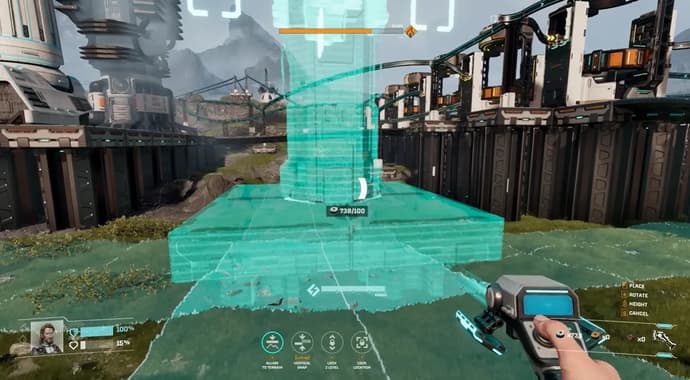
In StarRupture, I found progress is tied directly to construction. You unlock new buildings not by exploring, but by completing projects for several corporations. This guide covers how to build, the requirements for every unlockable structure, and how to use key tools. The goal is an efficient, automated base that survives the planet's hazards.
How to Build in StarRupture
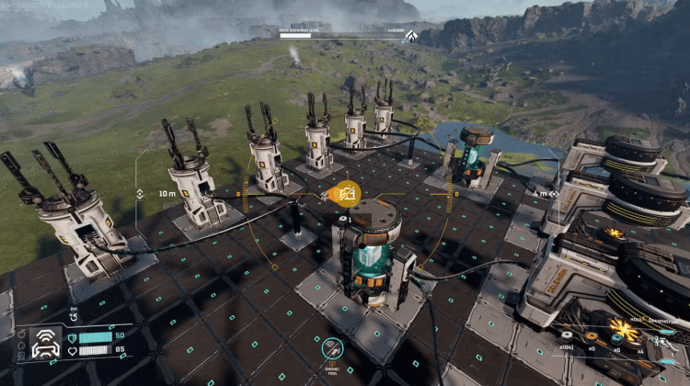
Building starts with a Base Core for protection, then Ore Excavators and power sources. Production machines like Smelters process the raw materials, all connected by a network of rails. I learned to plan the entire production chain before placing a single foundation.
- Press B to open the building menu.
- Press Z to copy the building under your crosshair.
- Press Y to lock a building’s elevation.
- Hold the Right Mouse Button to place multiple platforms.
- Press F to enter deconstruction mode.
I build my production floors on large, flat terrain whenever possible, leaving space between machines for rails and future additions. The key is modularity, since I frequently rebuild factories to accommodate new unlocks from the commission-based progression system. I also place my Base Core in a defensible spot away from the main flow of materials, since enemies attack from nearby Monoliths.
Every Building and How To Unlock Them
Buildings become available as you increase your level with the game's various corporations. Fulfilling their project requests requires submitting specific resources and large quantities of Data Points.
| Building | Corporation Level Requirement | Resource Requirements | Building Description |
| Assembler | Selenian Corporation Level 10 | 262,600 Data Points, Turbines | Makes use of nanoscale printing to create Accumulators, Generators, Electromagnets, Pressure Tanks, Resonators, Condensers, Laser Emitters, and Scanners. |
| Base Core | Selenian Corporation Level 1 | None (Available Immediately) | Allows placement for exterior buildings and structures, while protecting these locations from Solar Ruptures. Does come with a limited capacity that you will need to upgrade. |
| Base Core Amplifier v.1 | Moon Energy Corporation Level 6 | 37,800 Data Points, Heat Resistant Sheets | Increase the Base Core capacity by 20. Must be placed within a Base Core's range to function. |
| Base Core Amplifier v.2 | Moon Energy Corporation Level 9 | 179,400 Data Points, Electromagnetic Coil | Increase your Base Core capacity by 250. Must be placed within a Base Core's range to function. |
| Cargo Dispatcher | Clever Robotics Level 7 | 69,700 Data Points, Stator | Sends items through a long distance transporation system. Must have a Cargo Receiver to operate. |
| Cargo Receiver | Clever Robotics Level 7 | 69,700 Data Points, Stator | Accepts item sthrough the long-distance transportation system. Must have a Cargo Dispatcher to operate. |
| Compounder | Future Health Solutions Level 9 | 179,400 Data Points, Hardening Agent or Pressurized Helium | Allows you to produce Synthetic Resin, Lens, Liquid Helium, Nanofiber, Ion Injector, and a Superconductor. |
| Defense Tower | Griffits Blue Corporation Level 9 | 179,400 Data Points, Batteries of Nozzles | A defensive structure that you can place inside your Base Core to protect your buildings from Vermin. It must have access to a supply of Standard Ammunition to work. |
| Defense Turret | Griffits Blue Corporation Level 6 | 37,800 Data Points, Stabilizers | A defense structure that you can put inside your Base Core to protect your buildings from Vermin. Must have a supply of Standard Ammunition to function. |
| Expandable Storage | Clever Robotics Level 13 | 658,300 Data Points, Superconductors | Sends out stored items to all connected buildings. Can hold up to 1,600 of a single item, and can be expanded granted it has more power. |
| Fabricator | Selenian Corporation Level 2 | 200 Data Points, Titanium Bars | Turns your Calcium Blocks, Titanium Bars, and Wolfram Bars into multiple items, such as Building Material, Wolfram Wire, Titanium Rods, Titanium Beams, Wolfram Plates, Tubes, Rotors, Applicators, and much more. |
| Furnace | Selenian Corporation Level 4 | 6,400 Data Points, Titanium Rods or Titanium Sheets | Turns your Calcium Blocks, Titanium Bars, and Wolfram Bars into Ceramics, Calcium Powder, Wolfram Powder, Titanium Housing, Glass, Synthetic Silicon, Chemicals, Supermagnet, and much more. |
| Habitat | Future Health Solutions Level 1 or Selenian Corporation Level 1 | None (Available Immediately) | Allows you to place down interior structures, and protects you from Solar Ruptures. You will need an Airlock to access it, and it must be within a Base Core. |
| Helium-3 Extractor | Selenian Corporation Level 6 | 37,800 Data Points, Tubes | Allows for automated harvesting of Helium when placed on Helium deposits inside a Base Core. |
| Large Habitat | Selenian Corporation Level 7 | 69,700 Data Points, Glass or Synthetic Silicon | A larger base foundation that allows you to place down internal buildings, protecting you from Solar Ruptures. You will need an airlock to access, and it must be within a Base Core. |
| Mega Press | Selenian Corporation Level 8 | 116,000 Data Points, Electronics or Synthetic Silicon | A high-speed production building that you can use to make products such as a Nozzle, Valve, Pump, Turbine, Battery, Shotgun Ammunition, Standard Ammunition, Intermediate Building Blocks, Heavy Ammunition, and an Electromagnetic Coil. |
| Multistorage | Cleverl Robotics Level 12 | 499,200 Data Points, Pressure Tanks | Stores excess items that have nowhere to go. Can handle up to 2,500 units of multiple types of items. |
| Orbital Cargo Launcher | Clever Robotics Level 1 | None (Available Immediately) | Sends provided items to Corporations to fulfill their requests. |
| Ore Excavator | Selenian Corporation Level 1 | None (Available Immediately) | Allows for automated harvesting of Calcium, Titanium, and Wolfram deposits inside a Base Core. |
| Refinery | Selenian Corporation Level 9 | 179,400 Data Points, Impeller | Allows you to process raw Helium, Sulphur, and Powerium into Sulfuric Acid and Pressurized Helium. |
| Smelter | Selenian Corporation Level 1 | None (Available Immediately) | Turns raw Calcium, Titanium, and Wolfram into Calcium Blocks, Titanium Bars, and Wolfram Bars |
| Solar Generator v.1 | Moon Energy Corporation Level 1 | None (Available Immediately) | A basic power generator that you can use to provide energy to your buildings. Must be connected inside a Base Core and touching a structure, or connected via a rail. |
| Solar Generator v.2 | Moon Energy Corporation Level 8 | 116,000 Data Points, Valves | An advanced power generator that can provide energy to your buildings. Must be within a Base Core and touching a structure, or connected through a rail. |
| Storage Depot v.1 | Clever Robotics Level 3 | 1,500 Data Points, Wolfram Bars or Wolfram Wires | Sends stored items to all connected buildings. Can only store up to 400 of a single type of item. |
| Storage Depot v.2 | Clever Robotics Level 8 | 116,000 Data Points, Nozzles or Supermagnets | Sends stored items to all connected buildings. Can only store up to 1,600 items of a single type of item. |
| Sulfur Extractor | Selenian Corporation Level 9 | 179,400 Data Points, Impeller | Allows you harvest Sulfur in large quantities while inside a Base Core. |
| Wind Turbine v.1 | Moon Energy Corporation Level 5 | 17,600 Data Points, Rotors | A basic power generator that turns wind into energy to provide power to your buildings. Must be connected to your buildings inside your Base Core by touching a building or connected through a rail. |
| Wind Turbine v.2 | Moon Energy Corporation Level 10 | 262,600 Data Points, Geneators | An advanced power generator, converting wind into energy for your buildings. Must be within a Base Core field and touching a structure, or connected through a rail. |
Many advanced projects require Blueprints, which I found in loot boxes at abandoned ruins. I also had to collect large amounts of Calcium and Helium for certain unlocks.

How to Use Building Drone
The Building Drone unlocks after reaching Level 4 with Clever Robotics by delivering Wolfram Wire and Plates. It provides a mobile camera for a top-down building perspective, which is essential for complex layouts. For more details, see the complete StarRupture drones guide.
- Use WASD to move the camera.
- Use Spacebar to ascend and CTRL to descend.
- Press B to open the building menu from the drone's view.
- Press F to enter deconstruction mode.
- Use the mouse wheel to adjust the structure height.
The drone is built using materials from your personal inventory, so I ensure I am well-stocked before starting a big project. It also has a limited range, preventing you from building too far from your character.
How To Destroy Buildings?
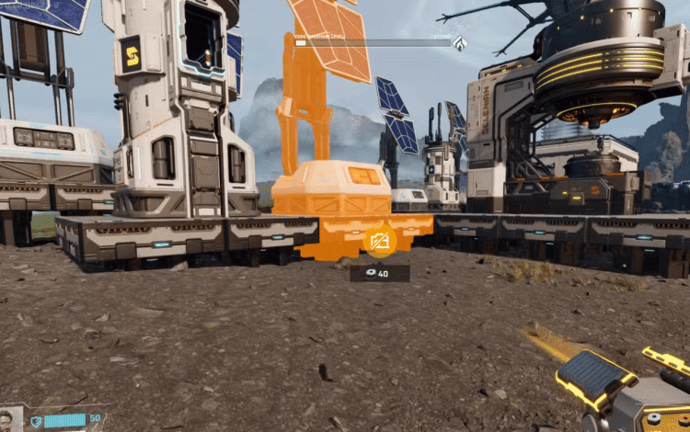
To remove any structure, press the F key to enter Deconstruction Mode. I then move the cursor over the building or rail and hold the left mouse button until the object disappears. Deconstruction returns 100% of the building materials to your inventory. The game currently does not allow you to move or edit existing structures; you must deconstruct and rebuild them.
Leveling & Blueprints
I learned that a clear strategy for upgrading corporations is essential for a smooth start. The optimal path, detailed in this Corporations guide, involves bringing all corporations to level two before focusing on Moon Energy to unlock the map. I found the most sustainable method is exporting materials using the Orbital Cargo Launcher, which steadily increases my standing. This is more effective long-term than spending Data Points, which I save for unlocking recipes.
Blueprints are the other major gate to progression, and they only appear in blue storage chests inside abandoned corporate bases. I learned to find all blueprint locations by looking for the house-style icons that appear on the map when I get close. These chests are often inside locked buildings, requiring me to find an alternate entry.

Vitalii Diakiv writes gaming blogs and guides, focusing on the latest announcements and games matched with pop-cultural phenomena. Second, he covers esports events Counter-Strike 2, Marvel Rivals, League of Legends, and others.



 Best Weapon In Marathon: Meta & TierlistOur definitive Marathon weapon tier list for March 2026. Discover the meta, find the best guns, and dominate your next match.
 vitaliiD
 Diablo IV New Warlock Class Overview: Release Date, Abilities, SkinsMaster the Warlock in Diablo 4! Our guide covers the April 28 release date, unique resources like Wrath and Dominance, powerful skills, and new legendary items for the Lord of Hatred expansion.
 Chillplay
 League of Legends For Demacia Battle Pass Season 1 Act 2: Rewards and Release DateLeague of Legends For Demacia Season 1 Act 2 Battle Pass guide. Learn about the 1650 RP cost, March 4 release, and all available cosmetic items and free progression.Chillplay
 MIDA: Rewards & Quests of the Marathon FactionComplete guide to the MIDA faction in Marathon: contracts, upgrades, rewards, and capstone bonuses. Learn how to earn reputation fast and dominate raids with sabotage tactics.
 fauesde
 #690
#690 QWENTRY
 #45
#45 Eternal FireWatch match