

How to Crossplay Borderlands 4
 7949
7949
Borderlands 4 supports full crossplay across all platforms, allowing players to join the same session regardless of their device. Crossplay is enabled through Gearbox’s SHiFT account system, which also manages promotional codes and account linking. Players must ensure their personal crossplay settings are turned on to connect with friends on other platforms. However, cross-progression is not available at launch, meaning saves and characters cannot be transferred between platforms for now.
How Crossplay Works in Borderlands 4
Borderlands 4 is a looter-shooter with an open-world structure, supporting up to four players in cooperative sessions.
Crossplay is available across PlayStation 5, Xbox Series X|S, PC, and Nintendo Switch 2, provided all players use a linked SHiFT account and enable the proper session settings.
Step | Action |
Create or log in to a SHiFT account | Required for crossplay access |
Link platform account to SHiFT | Connect Steam, PlayStation, Xbox, or Switch profile |
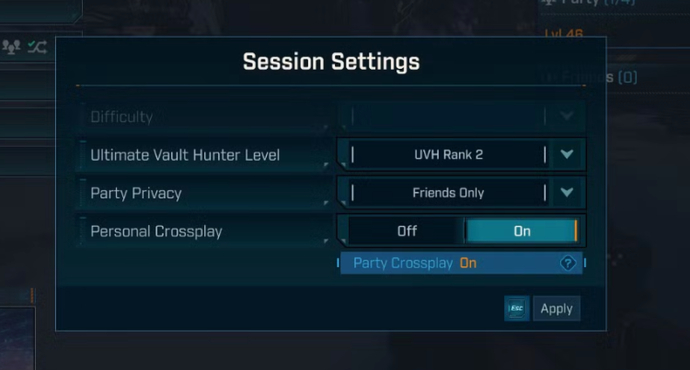
Open Session Settings | Accessible from main menu or pause menu |
Enable Personal Crossplay | Allows players from other platforms to join |
Confirm Party Crossplay status | Ensures all party members have crossplay enabled |
Invite friends | Squad up regardless of platform |
Note: If Personal Crossplay is disabled, only players on the same platform can join your session.
Crossprogression in Borderlands 4
At launch, Borderlands 4 does not support cross-save or cross-progression. This means progress, characters, and items are locked to the platform on which the save file was created. Players who purchase the game across multiple platforms must start from the beginning each time.
Gearbox has confirmed in a Steam update that cross-progression is “on their radar” and may be added in a future patch. If implemented, players should expect that each platform will still require a separate purchase of the game before saves can be transferred between ecosystems.
Borderlands 4 System Requirements
Borderlands 4 has demanding hardware requirements, with a significant jump in both minimum and recommended specs compared to previous entries. At launch, Borderlands 4 needs further performance optimization for stable play. The minimum specs target 1080p at 30FPS with low settings, requiring an 8-core i7-9700 or Ryzen 7 2700X, 16 GB RAM, and a mid-tier GPU like the RTX 2070. In contrast, the recommended specs aim for 1440p at 60FPS with medium settings, doubling the RAM to 32 GB and raising GPU demands to high-end cards such as the RTX 3080 or RX 6800 XT. Both configurations require an SSD and 100 GB of storage.

Vitalii Diakiv writes gaming blogs and guides, focusing on the latest announcements and games matched with pop-cultural phenomena. Second, he covers esports events Counter-Strike 2, Marvel Rivals, League of Legends, and others.


 When Does the Next Dota 2 Patch Drop?When is the next Dota 2 patch coming? A quick look at Valve signals, Reddit expectations, and why TeaGuvnor streams might mean it’s close.
 stawraith
 Crimson Desert Abyss Artifacts: What They Are and How to Get ThemDiscover every method to get Abyss Artifacts in Crimson Desert, from XP farming and quests to Sealed Artifacts, puzzles, and vendors—optimize your build efficiently.
 fauesde
 LEC Spring 2026 Season Viewer Guide: Dates, Schedule, Format, ParticipantsComprehensive viewer guide for LEC Spring 2026. Find the complete match schedule, participating teams, format changes, and analytical betting tips for the upcoming LoL season.
 Chillplay
 ESL One Birmingham 2026 Group Stage Day 2 Results and Day 3 ScheduleGamerLegion surprise everyone, while Aurora Gaming confidently secure 2 victories. Discover the results of all Day 2 matches and the schedule for Matchday 3 of ESL One Birmingham 2026.
 Dima Ostapchuk
 #4
#4 Team Spirit
 #9
#9 Xtreme GamingWatch match