

How To Install Mods in STALKER 2 on Steam and Xbox
 18755
18755
On November 20, 2024, one of the most anticipated games of the year, S.T.A.L.K.E.R. 2: Heart of Chornobyl, was released. This first-person horror shooter is a sequel to the previous installments of the Stalker series, developed by GSC Game World, renowned for their gameplay and atmospheric design. S.T.A.L.K.E.R. 2 takes you to the Chernobyl Exclusion Zone, where you’ll play as a Skifr – stalker searching for fantastic artifacts while facing mutants and other challenges.
However, S.T.A.L.K.E.R. is not only famous for its gameplay but also for being one of the games with the largest number of mods. Almost immediately after the release of this new installment of the cult series, players and specialists began creating new mods, which are already available for installation. In this guide, we’ll explain how to install STALKER 2 mods on Steam and Xbox platforms, allowing you to customize the game to your taste.
What is Mods in STALKER 2
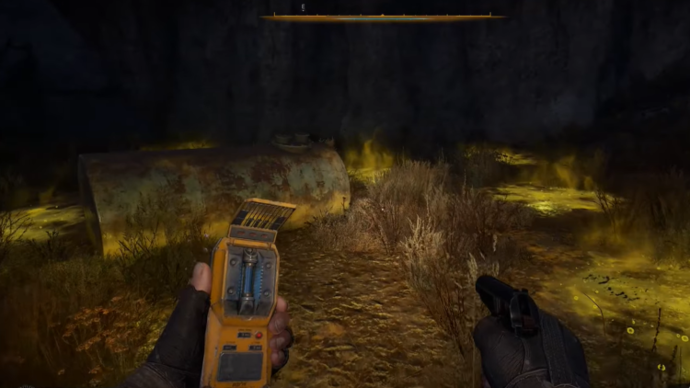
Mods in STALKER 2 are modifications created by users or the gaming community that can alter the game, add unique content, and more. In the original versions of STALKER, mods became a widespread phenomenon and even gained a cult following. Players developed mods featuring unique weapons, new locations, enhanced detailing, and improved textures. These mods allowed the community to keep the game alive to this day and contributed to the recognition of the series as one of the best in gaming history.
STALKER 2 is a new game, meticulously designed with great style, object physics, and gameplay, making it enjoyable even without mods. However, the use and creation of Mods for STALKER 2 can not only make the game more fun but also play a similar role to that in previous installments. Mods offer players tools to personalize and expand the already vast game world, adding new dimensions to their experience.
Stalker 2: Heart of Chornobyl How To Install Mods Xbox Game Pass
Now that you know what mods are, it’s essential to understand how to install mods for STALKER 2. Installing mods in STALKER 2: Heart of Chornobyl differs depending on your platform. However, the general method is similar: after finding the mod you want to install, download it and place all.pak files into the appropriate folder. If you’re unsure where the folder is or how to access Game Pass files, follow these steps:
- Open the Xbox app.
- Right-click on STALKER 2.
- Select Manage.
- Go to the Files tab.
- Click Browse.
After completing these steps, the main folder containing the STALKER 2 installation will open. The folder hierarchy is similar to the Steam version, so locate the directory and create a new folder for storing mods. If you’ve followed all the steps correctly, the installed STALKER 2 mods will appear in the game when you launch it.
Stalker 2: Heart of Chornobyl How To Install Mods Steam
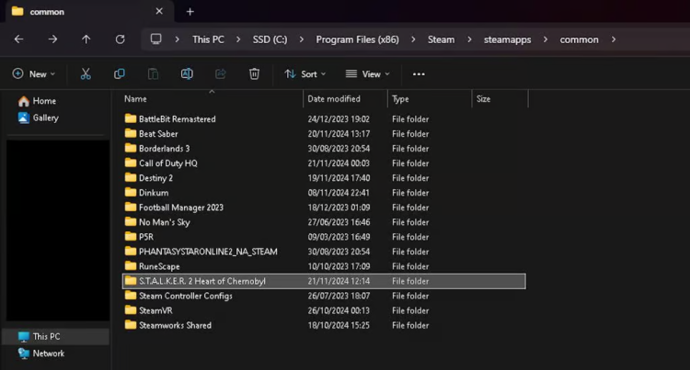
If you're playing on PC, downloading STALKER 2 mods is slightly easier. In this case, installing mods usually depends on the specific mod. In most cases, you can simply install the content by placing all.pak files into the installation folder. For most players, this folder is located here:
- C:\Program Files (x86)\Steam\steamapps\common
Next, select the folder for the game and install Mods STALKER 2 in the following directory:
- Stalker2\Content\Paks~mods
If the mods folder doesn’t exist, create one yourself. Be sure to include the tilde (~) in the folder name.
How To Install.pak Files

Each file has its own classification. Mods for STALKER 2 come in several formats, including.pak and.ini..pak files will require you to extract them from one category and place them into another. Most files of this format are used for mods in Steam. Follow the steps mentioned in the previous paragraph, or use the following steps to correctly install STALKER 2 mods:
- Open your Steam Library.
- Right-click on STALKER 2.
- Find the Manage menu.
- Select Browse Local Files.
After that, open the Stalker2\Content\Paks~mods folder and upload the mods. Pay attention to the sources from which you’re installing mods—they should be official and verified.
How To Install.ini Files
If you understand how to handle.pak files,.ini files can sometimes be a bit more complicated. These files are typically used when players encounter issues with graphics settings or performance optimization in STALKER 2: Heart of Chornobyl. Proper performance settings can help make the game run smoothly without lag or crashes. The following steps will help you configure STALKER 2:
- Press Windows + R.
- Type%localappdata% in the Run dialog.
- Navigate to Local\Stalker2\Saved\Config\Windows.
- Make a backup of any files you plan to replace.
Additionally, it’s equally important to note that you can either replace all existing.ini files with new ones or simply copy and paste the text lines into the files that are already there. If you follow all these steps correctly, you should have no issues installing mods and configuring STALKER 2.
Are S.T.A.L.K.E.R. 2 mods free?
Many people interested in installing mods for S.T.A.L.K.E.R. 2 wonder whether they are free. The answer depends on the type of mods and where you plan to download them. If it’s a professional mod pack created by a team of developers, it’s usually a paid product. However, in most cases, almost all S.T.A.L.K.E.R. 2 mods are free and easy to install.
Importance of Mods
Mods STALKER 2 are more than just visual or gameplay updates; they are a crucial aspect of STALKER that sets it apart from other games and titles. They have evolved into something special that allows players to customize their gaming experience, reduce lag, and add entirely new dimensions to the game. Therefore, understanding How to install mods STALKER 2 is an important aspect if you want to fully grasp the game and be part of the gaming community.
Moreover, mods help foster a thriving community by encouraging collaboration between creators and fans. If the development and creation of mods continue, STALKER 2 will undoubtedly benefit from them, keeping the game alive and maintaining its popularity, just as it happened with previous installments in the series. You also find it interesting to read another one of our articles – All Factions in S.T.A.L.K.E.R. 2: Heart of Chornobyl, which will help you better understand the game and learn about the factions it features. In the future, you can use this information when downloading mods.
Conclusion
Bringing all the facts together, it can be said that STALKER 2 mods can truly enrich the in-game environment and make players' adventures in the Chernobyl Zone more engaging and exciting. Whether you’re using Steam or Xbox, installing mods for STALKER 2 is an enjoyable process that connects you with a vibrant community of fans and creators. We highly recommend all esports enthusiasts try playing this game and experimenting with mods to personalize and enhance their gameplay experience.

Ostapchuk Dmytro – writer at EGamersWorld, ESports & Gaming Specialist
Dmytro started working at EGamersWorld in 2024 as a writer and later became a blog editor. His main focus is on esports disciplines Dota 2 and CS2. His tasks include finding topics that interest EGamersWorld readers and covering game updates, their features, and major esports tournaments.
Dmytro has recently begun working in this field, so he is learning a lot and making noticeable progress in this direction.

 All Relics In Slay The Spire 2 ExplainedSlay the Spire 2 early access has over 250 relics — every one listed by rarity with effects and build tips.
 vitaliiD
 NaVi Fantastic Debut At LECExplore Natus Vincere's return to the League of Legends tier-1 scene. Learn about the new NAVI roster, their surprising success at LEC Versus 2026, and their future prospects in the league.
 Chillplay
 Los Ratones Lost the Playoffs but Won the HeartsExplore how Caedrel's team Los Ratones performed at LEC Versus 2026. Learn about their tournament results, massive fan support, and the future of the roster after leaving the project.Chillplay
 Rumors: Caps Will Be The Next Hall Of Fame LegendWill LEC star Caps be the next player in the LoL Hall of Legends? We discuss his career, media impact, and the regional pattern after Faker and Uzi that points to him as the prime candidate.Chillplay
 #7
#7 Xtreme Gaming
 #8
#8 AuroraWatch match